
MomentSift
helps users cull, organize, enhance, and export large photo batches with AI-assisted screening
About MomentSift
MomentSift is an AI photo culling and editing tool for people with large photo folders. Users import a folder, let AI screen the set, compare similar shots, choose keepers, then export or enhance selected photos.
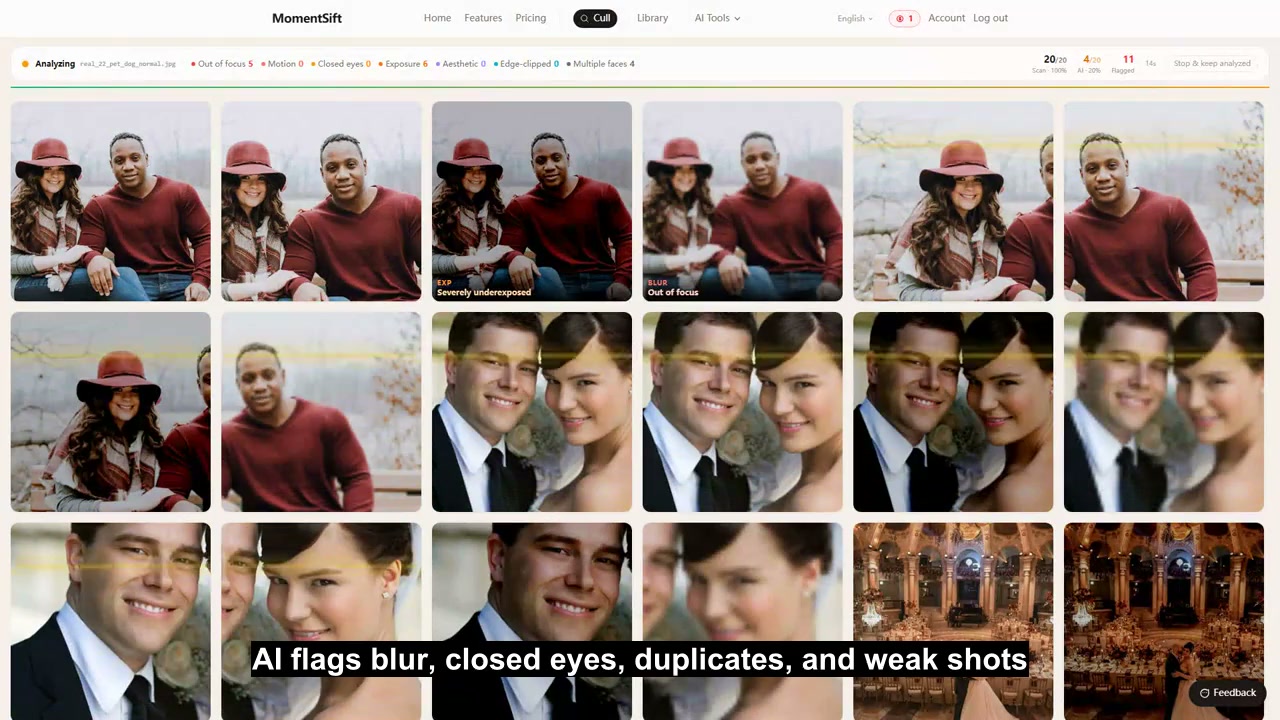
The homepage says MomentSift flags blur, closed eyes, exposure issues, and duplicate or similar shots. It also groups photos by scene, gives rejection reasons and scores, and leaves the final keep or reject decision to the user.
MomentSift keeps originals local for core culling work. Basic detection runs in the browser, while deeper AI analysis uploads compressed preview images that are discarded after processing. AI enhancement and generation features use cloud processing.
Pricing combines culling quota and AI creation credits. The free trial includes 100 AI culling quota and 10 AI creation credits with no card required, while paid monthly plans start at $19.90/month.
Features
- AI flags blur, closed eyes, and groups similar photos
- Enhance photos with upscaling, denoise, and face restoration
- Review AI suggestions while keeping the final selection in your control
- Lightroom XMP export marks picks with a 5-star green label
- Supported formats include JPG, PNG, HEIC, RAW, CR2, CR3, NEF, ARW, RAF, and DNG
Use cases
- Quickly choose keepers from thousands of travel photos
- Restore and retouch family and old portrait collections
- Select best shots from event or wedding photography
- Export selected originals for delivery or Lightroom post-processing
- Enhance chosen photos with denoise, 4x upscale, face restoration, or portrait retouching
Screenshots

Frequently asked questions
What is MomentSift?
MomentSift helps you sort large photo collections by grouping similar shots and flagging issues like blur or closed eyes; you decide which to keep and can enhance or create images from your picks.
Do my photos get uploaded to a server?
Your original photos remain on your device during culling. Compressed previews are sent for AI analysis, and cloud-based enhancement or generation may upload images for processing.
Do I need to install any software?
No installation is required; MomentSift runs in a web browser.
What happens if browser data is cleared?
Local library items may no longer be available if site data is cleared, browsers are switched, or local storage is evicted
Which browser is recommended for large batches?
The FAQ recommends desktop Chrome or Edge for large folders, RAW files, and hundreds or thousands of photos
What we verified
- Public API?
- Not stated
- Self-hostable?
- Not stated
- Free tier without a credit card?
- Yes, the homepage lists 100 photos plus 10 AI credits with no card required
- Pricing model?
- Subscription plans plus one-time credit packs
- Price?
- Free trial; Pro $19.90/mo; Studio $39.90/mo; Premium $69.90/mo; credit packs start at $9.90
- Data region / hosting location?
- Not stated
- Named integrations?
- Lightroom XMP rating export
Could not be verified
- Public API availability or developer documentation
- Whether MomentSift can be self-hosted
- Hosting region, data residency, uptime, SLA, and support response time
- Which third-party AI providers process enhancement or generation jobs
- Exact upload size limits and maximum photo count per batch beyond plan quotas
- Whether mobile browsers handle RAW batches reliably
0 comments
Sign in to leave a comment.
No comments yet. Say something useful and be the first.