

Seedance 2.5
Create seamless 30-second AI videos with up to 50 multimodal references and local editing.
About Seedance 2.5
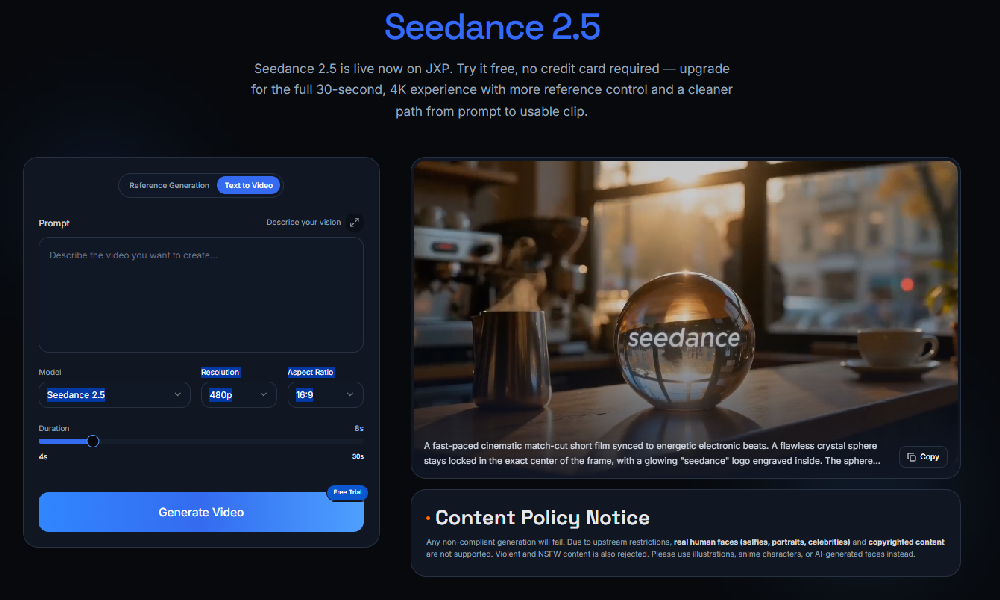
Seedance 2.5 is an AI video generation model available on JXP for creating longer, more controlled video clips from prompts and references. It supports native single-segment output up to 30 seconds, allowing users to create a continuous clip without stitching multiple short generations together. The creation panel includes reference generation, text-to-video, asset upload, prompt input, model selection, resolution, aspect ratio, duration controls, and video generation.
Users can combine up to 50 multimodal references, including text, images, video, audio, and 3D white-model blockouts. These references can guide characters, products, environments, camera motion, timing, sound, and spatial composition. Seedance 2.5 also supports second-level scene control for pacing, camera language, emotional beats, tone, action rhythm, and visual style across a full clip.
The workflow includes writing a scene prompt, adding reference materials, generating the clip, reviewing consistency, refining local details, and exporting. JXP offers 480p, 720p, and 1080p output, with common aspect ratios including 16:9, 9:16, and 1:1.
Features
- Generate single-shot videos up to 30 seconds with no stitching
- Use up to 50 multimodal references including images, video, audio, and 3D models
- Perform local edits on generated videos without full re-rendering
- 480p, 720p, and 1080p output with 16:9, 9:16, and 1:1 ratios
Use cases
- Create narrative story sequences with continuous camera motion
- Produce product demo videos featuring detailed visual references
- Make cinematic visuals blending various artistic styles and moods
- Build short educational or explainer videos
Screenshots

Frequently asked questions
How long can Seedance 2.5 videos be?
Videos can be generated up to 30 seconds in one continuous shot without stitching.
What types of references can Seedance 2.5 use?
It accepts up to 50 multimodal inputs, including text, images, audio, video, and 3D blockouts.
Can I edit parts of the video after generation?
Yes, Seedance 2.5 allows more controllable local editing to fix details without re-rendering the entire clip.
What resolutions and aspect ratios are available?
JXP offers 480p, 720p, and 1080p output, with common aspect ratios including 16:9, 9:16, and 1:1.
0 comments
Sign in to leave a comment.
No comments yet. Say something useful and be the first.