
inBetween: Forward your business WhatsApp to the right coworker
Forwards WhatsApp messages from your business number to a coworker, who replies from their own phone. Free tier, 30-day Pro+ trial.
About inBetween
InBetween solves a small, specific problem: the person doing the work isn't the person holding the business phone. You connect your existing WhatsApp or WhatsApp Business number by scanning a QR code, like WhatsApp Web, and customer messages are forwarded to a coworker's own WhatsApp. They reply from their phone, and the customer sees it come back from the business number, none the wiser. Photos, voice notes, documents and pinned locations get forwarded too, and coworkers install nothing. By default customers show up to them as "Customer 1," "Customer 2" with numbers hidden. It's aimed at auto shops, plumbers, installers, cleaners and clinics, the kind of outfit with one number and staff out on jobs.
The thing to be clear about is how it connects. It uses linked-device technology like WhatsApp Web, not the official WhatsApp Business API, and the site says plainly it isn't an official Meta integration. That keeps setup simple, but it's an unofficial method, so anyone needing a sanctioned API setup is pointed elsewhere. On data, it's EU-based: servers in Germany (Hetzner), AES-256 session encryption, an optional memory-only mode, and payments through Mollie.
Pricing is in euros: Basic is free forever but capped at 1 coworker and 25 messages a month; Pro is €87/month (2 coworkers, 2,000 messages, hidden numbers); Pro+ is €142/month (up to 20 coworkers, unlimited). Only incoming messages count toward limits, not replies. Every new account gets 30 days of Pro+ free with no card. It's made by InBetween in the Netherlands. One practical note: the marketing site is in seven languages, but the app dashboard is currently Dutch only.
Features
- Forwards WhatsApp messages from your business number to a coworker's own WhatsApp
- Replies go back to the customer from the business number, so forwarding is invisible to them
- Passes along photos, voice notes, documents and shared locations
- Hides customer numbers by default, showing them as "Customer 1," "Customer 2"
- Connects by QR code like WhatsApp Web, with nothing for coworkers to install
Use cases
- An auto shop routing a customer's WhatsApp photos to the mechanic handling the job
- A plumber or installer replying to customers from their own phone, off the shared number
- A clinic passing enquiries to whichever staff member is free, without sharing the main line
Screenshots


Frequently asked questions
Do I need a new WhatsApp number to use InBetween?
No, you use your existing WhatsApp or WhatsApp Business number just like WhatsApp Web.
Can customers tell their message was forwarded?
No. They chat with the business number as normal, and replies come back from it.
Is it an official WhatsApp integration?
No. It uses linked-device technology like WhatsApp Web, not the WhatsApp Business API, and isn't an official Meta integration.
Is there a free version?
Yes. Every account gets 30 days of Pro+ free with no card, then can stay on Basic (1 coworker, 25 messages a month). Pro is €87 and Pro+ €142 a month.
Checked by Shoaib on
What we verified
- Free plan?
- Basic, €0 forever, 1 coworker, 25 messages/month
- Trial?
- 30 days of Pro+ free, no card
- Paid plans?
- Pro €87/month, Pro+ €142/month
- Connection?
- WhatsApp Web-style linked device, not the official Business API
- Data?
- Servers in Germany (Hetzner), AES-256 session encryption
- Company?
- InBetween, Netherlands
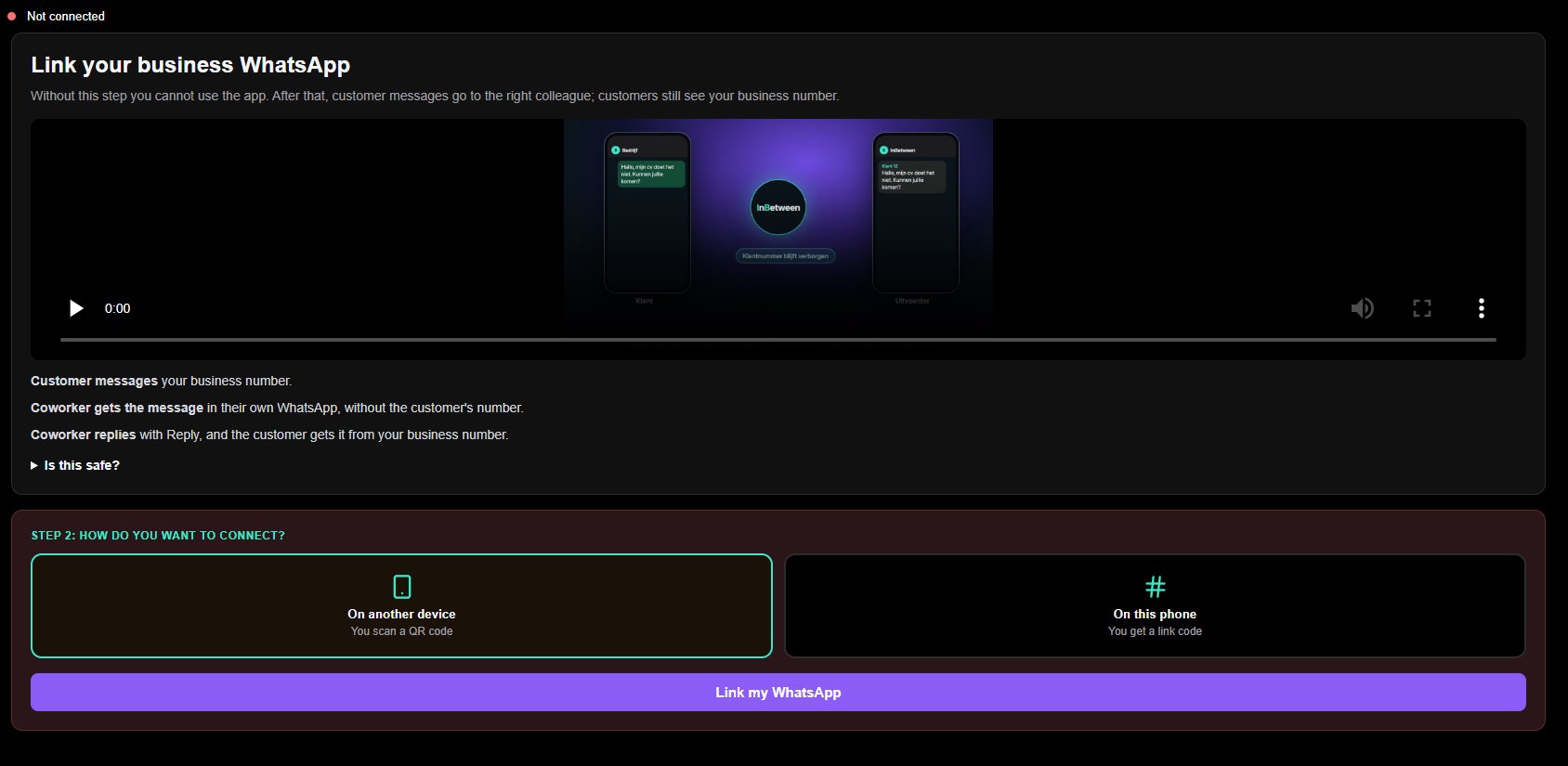
Read the pricing page for the plan limits and the FAQ to confirm it forwards from your existing number and isn't an official WhatsApp API integration. I then created an account and signed in to check and confirm the process of linking a business whatsapp account.
1 comment
Sign in to leave a comment.
Nice fix for the one-business-number problem. The coworker replying from their own WhatsApp while the customer still sees the business number is the clever bit.